
Ion Pump Controllers
Table of contents
The vac module supports several ion pump controller models through the digitel record type and the devDigitelPump ASYN device support driver. Each digitelPump.db instance creates a single digitel record that handles pressure, voltage, current, operating mode, setpoints, bakeout, and pump identification for one pump.
For the QPC, alternative databases using streamDevice and Modbus are also available.
Supported Models
Digitel 500/1500
- Manufacturer: Physical Electronics (Perkin-Elmer)
- Communication: RS-232 only
- Serial settings: 9600 baud, 7 data bits, even parity, 1 stop bit
- Input EOS:
\n\r– Output EOS:\r - DEV value:
D500orD1500 - ADDR: 0 (not used)
- STN: Setpoint number (0–3)
The Digitel 500 and 1500 are single-pump controllers. STN selects the setpoint number to read back rather than a pump number.
MPC/MPC-II
- Manufacturer: Gamma Vacuum (formerly Gamma One)
- Communication: RS-232 and RS-485
- Serial settings: 9600 baud, 8 data bits, no parity, 1 stop bit
- Input EOS:
\r– Output EOS:\r - DEV value:
MPC - ADDR: Device address (0–255, must match hardware setting)
- STN: Pump number (1 or 2)
The MPC supports two pumps per controller. Each pump has its own setpoints: pump 1 uses odd-numbered setpoints, pump 2 uses even-numbered setpoints.
The LPC uses the same protocol and can be configured with DEV=MPC.
MPC-II firmware 3.6 reports setpoint status inverted over the serial port. Recommended firmware versions are 3.45 or 3.61.
QPC/QPCe
- Manufacturer: Gamma Vacuum
- Communication: RS-232, RS-485, and Ethernet (QPCe)
- Serial settings: 9600 baud, 8 data bits, no parity, 1 stop bit
- Input EOS:
\r– Output EOS:\r - DEV value:
QPC - ADDR: Device address (0–255, must match hardware setting)
- STN: Pump number (1–4)
The QPC is a quad pump controller. The driver associates each pump number with the same-numbered setpoint (pump 1 uses setpoint 1, pump 2 uses setpoint 2, etc.). Load one digitelPump.db instance per pump.
The QPC can also be controlled through streamDevice or Modbus databases which use standard EPICS record types.
Tested on firmware versions 1.27, 1.30, and 1.35. Command 3B (combined setpoint read/write) reads correctly but does not set properly. The driver uses commands 3C and 3D instead.
SPCe
- Manufacturer: Gamma Vacuum
- Communication: RS-232, RS-485, Ethernet
- DEV value:
QPC(use the QPC device type)
The SPCe is a single pump controller that uses the same protocol as the QPC. Set DEV=QPC in the database substitutions. Do not use DEV=MPC, as the MPC driver requests multiple setpoints which causes errors with the SPCe.
Database: digitelPump.db
Each instance of digitelPump.db creates one digitel record for a single pump. The record name is $(P)$(PUMP).
Macro Reference
| Macro | Description | Values |
|---|---|---|
P | PV prefix | Any valid PV prefix (e.g. SR:) |
PUMP | PV suffix identifying the pump | e.g. IP1, IP2 |
PORT | ASYN port name | First argument from drvAsynSerialPortConfigure or drvAsynIPPortConfigure |
ADDR | Device address | 0 for Digitel 500/1500; hardware address for MPC/QPC |
DEV | Device type | D500, D1500, MPC, or QPC |
STN | Station number | Setpoint number (0–3) for D500/D1500; pump number (1–2) for MPC; pump number (1–4) for QPC |
Example: Using iocsh Scripts (Recommended)
The iocsh scripts handle serial port configuration and database loading automatically:
# MPC pump 1 on a serial port
iocshLoad("$(VAC)/iocsh/digitelPump.iocsh", "PREFIX=SR:, INSTANCE=IP1, PORT=/dev/ttyUSB0, DEV=MPC, STN=1, ADDR=5")

# MPC pump 2 on the same serial port
iocshLoad("$(VAC)/iocsh/digitelPump.iocsh", "PREFIX=SR:, INSTANCE=IP2, PORT=/dev/ttyUSB0, DEV=MPC, STN=2, ADDR=5")

# Digitel 500
iocshLoad("$(VAC)/iocsh/digitelPump.iocsh", "PREFIX=SR:, INSTANCE=IP3, PORT=/dev/ttyUSB1, DEV=D500, STN=2")

# All four pumps on a QPC
iocshLoad("$(VAC)/iocsh/digitelPump.iocsh", "PREFIX=SR:, INSTANCE=IP1, PORT=IP1_4, DEV=QPC, STN=1, ADDR=5")
iocshLoad("$(VAC)/iocsh/digitelPump.iocsh", "PREFIX=SR:, INSTANCE=IP2, PORT=IP1_4, DEV=QPC, STN=2, ADDR=5")
iocshLoad("$(VAC)/iocsh/digitelPump.iocsh", "PREFIX=SR:, INSTANCE=IP3, PORT=IP1_4, DEV=QPC, STN=3, ADDR=5")
iocshLoad("$(VAC)/iocsh/digitelPump.iocsh", "PREFIX=SR:, INSTANCE=IP4, PORT=IP1_4, DEV=QPC, STN=4, ADDR=5")
Example: Manual st.cmd Configuration
For manual configuration, set up the ASYN port and load the database directly:
# QPC via Ethernet using a Moxa terminal server (port 4002)
drvAsynIPPortConfigure("IP1_4", "10.6.33.133:4002", 0, 0, 0)
asynOctetSetInputEos("IP1_4", -1, "\r")
asynOctetSetOutputEos("IP1_4", -1, "\r")

dbLoadRecords("db/digitelPump.db", "P=FE:28:ID:,PUMP=IP1,PORT=IP1_4,ADDR=5,DEV=QPC,STN=1")
dbLoadRecords("db/digitelPump.db", "P=FE:28:ID:,PUMP=IP2,PORT=IP1_4,ADDR=5,DEV=QPC,STN=2")
dbLoadRecords("db/digitelPump.db", "P=FE:28:ID:,PUMP=IP3,PORT=IP1_4,ADDR=5,DEV=QPC,STN=3")
dbLoadRecords("db/digitelPump.db", "P=FE:28:ID:,PUMP=IP4,PORT=IP1_4,ADDR=5,DEV=QPC,STN=4")
# Digitel 500 on a local serial port
drvAsynSerialPortConfigure("serial5", "/dev/ttyUSB0", 0, 0, 0)
asynSetOption("serial5", -1, "baud", "9600")
asynSetOption("serial5", -1, "bits", "7")
asynSetOption("serial5", -1, "parity", "even")
asynSetOption("serial5", -1, "stop", "1")
asynOctetSetInputEos("serial5", -1, "\n\r")
asynOctetSetOutputEos("serial5", -1, "\r")

dbLoadRecords("db/digitelPump.db", "P=MR:,PUMP=IP1,PORT=serial5,ADDR=0,DEV=D500,STN=2")
# MPC on RS-485
drvAsynSerialPortConfigure("serial6", "/dev/ttyUSB1", 0, 0, 0)
asynSetOption("serial6", -1, "baud", "9600")
asynSetOption("serial6", -1, "bits", "8")
asynSetOption("serial6", -1, "parity", "none")
asynSetOption("serial6", -1, "stop", "1")
asynOctetSetInputEos("serial6", -1, "\r")
asynOctetSetOutputEos("serial6", -1, "\r")

dbLoadRecords("db/digitelPump.db", "P=MR:,PUMP=IP2,PORT=serial6,ADDR=5,DEV=MPC,STN=1")
dbLoadRecords("db/digitelPump.db", "P=MR:,PUMP=IP3,PORT=serial6,ADDR=5,DEV=MPC,STN=2")
GUI Displays
Display files are provided in MEDM (.adl), caQtDM (.ui), CSS-BOY (.opi), EDM (.edl), and Phoebus (.bob) formats.
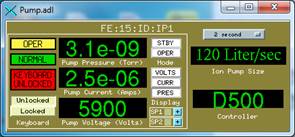
Pump.adl / Pump_sp.adl
Main display and setpoint display for Digitel 500/1500, MPC, and MPC-II controllers. Can also be used with the QPC, though the keyboard lock and display mode buttons will not function (keyboard lock would disable RS-232 communications on the QPC).
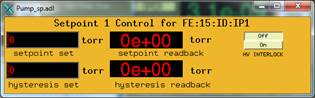
It is not recommended to set the setpoints remotely. The appropriate personnel should set setpoints locally on the device.
medm -x -macro "P=FE:15:ID:,PUMP=IP1" Pump.adl
QPCsingle_pump.adl / QPCpumps.adl
Displays designed specifically for the QPC. The single pump display shows one pump, while the multi-pump display shows all four.
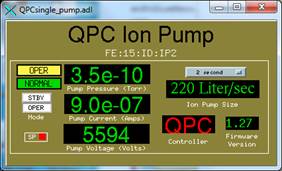
The setpoint indicator must be configured so that setpoint N corresponds to pump N.
medm -x -macro "P=FE:15:ID:IP,PUMP1=2" QPCsingle_pump.adl
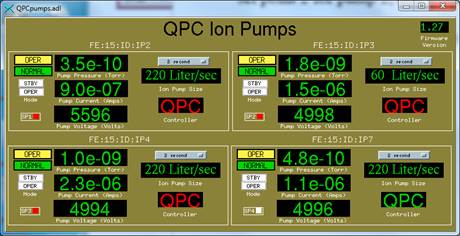
medm -x -macro "P=FE:15:ID:IP,PUMP1=2,PUMP2=3,PUMP3=4,PUMP4=7" QPCpumps.adl
Serial Settings Summary
| Device | Baud | Data Bits | Parity | Stop Bits | Input EOS | Output EOS |
|---|---|---|---|---|---|---|
| D500 / D1500 | 9600 | 7 | Even | 1 | \n\r | \r |
| MPC / MPC-II | 9600 | 8 | None | 1 | \r | \r |
| QPC / QPCe | 9600 | 8 | None | 1 | \r | \r |