
Autosave Restore
Table of Contents
- Overview
- Important Nuances
- How to Use Autosave
- autosaveBuild (Automatic Request-File Generation)
- asVerify
- configMenu
- About Save Files
- Module Contents
- User-Callable Functions
- Example of Use
Overview
Autosave automatically saves the values of EPICS process variables (PVs) to files on a server and restores those values when the IOC (Input-Output Controller — the business end of EPICS) is rebooted. The original author is Bob Dalesio; improvements were made by various contributors including Frank Lenkszus, Ron Sluiter, Andrew Johnson, Pete Jemian, Markus Janousch, David Maden, Zheqiao Geng, and Michael Davidsaver.
Autosave is a two-part operation:
- Run-time save: Started by commands in the IOC startup file and persists while the IOC is running. It saves PV values to files and supports manual restore operations.
- Boot-time restore: Invoked during iocInit via an EPICS initHook. It restores PV values from files and does not persist after iocInit() returns.
The autosave module also contains:
- asVerify: A client program to compare written autosave files with current PV values
- configMenu: A facility for creating, saving, finding, restoring, and verifying IOC configurations
- autosaveBuild: A facility to generate autosave-request files as part of dbLoadRecords() and dbLoadTemplate()
Important Nuances
- Boot-time restore:
- Uses dbStaticLib to write PVs (like dbLoadRecords())
- Does not cause record processing to occur
- Does not set UDF to 0 (except for arrays)
- Arrays are written using database access
- Run-time restore:
- Uses channel-access for reading and writing
- May cause record processing to occur
- Prior to autosave 5.6, arrays were read/written using database access
- From autosave 5.6, arrays use channel access
- Restore timing:
- Can occur at two times: before record initialization (“pass 0”) and after (“pass 1”)
- Choice applies to entire files, not individual PVs
- Motor-record positions should only be restored during pass 0
- Arrays cannot be restored during pass 0
- Save/Restore options:
- You can save PVs without restoring them and restore without saving
- These choices apply to entire files, not individual PVs
- Automated saves can be enabled/disabled for specified time periods
How to Use Autosave
1. Build (required)
Build the module and include the resulting library and database-definition file in your IOC:
# In configure/RELEASE
AUTOSAVE=<path to the autosave module>

# In xxxApp/src/Makefile
xxx_LIBS += autosave
xxx_DBD += asSupport.dbd
2. Write Request Files (optional but common)
Create files specifying PVs to save and restore:
# Example auto_settings.req
xxx:m1.VAL
xxx:m2.VAL
Request files can use macro variables:
$(P)m1.VAL
$(P)m2.VAL
And can include other request files:
file motor_settings.req P=xxx:,M=m1
3. Set Request-File Path (optional, recommended)
Specify directories to search for request files:
# For systems using cdCommands
set_requestfile_path(startup, "")
set_requestfile_path(startup, "autosave")
set_requestfile_path(area_detector, "ADApp/Db")

# For systems using envPaths
set_requestfile_path("$(TOP)/iocBoot/$(IOC)", "")
set_requestfile_path("$(TOP)/iocBoot/$(IOC)", "autosave")
set_requestfile_path("$(AREA_DETECTOR)", "ADApp/Db")
4. Set NFS Host (optional, only for vxWorks and RTEMS)
save_restoreSet_NFSHost("oxygen", "164.54.49.4")
5. Use NFS (required on vxWorks)
Use NFS for file operations. Autosave is tested with NFS and may not work with vxWorks’ netDrv.
6. Set Save/Restore File Path (optional but common)
set_savefile_path("/full/path")
7. Give Write Permission (required)
Ensure the IOC has write permission to the autosave directory.
8. Specify Restore Files (optional but common)
set_pass0_restoreFile("auto_settings.sav", "P=xxx:")
set_pass1_restoreFile("auto_settings.sav", "P=xxx:")
Notes on restore passes:
- Link fields can only be restored in pass 0
- Motor record DVAL is only used if hardware value is zero
- Arrays cannot be restored during pass 0
- Scalar PVs with DBF_NOACCESS type cannot be restored in pass 0
9. Load initHook Routine (required for boot-time restore)
This happens automatically if the IOC is built as described.
10. Select Save-File Options (optional, recommended)
# Enable dated backup files
save_restoreSet_DatedBackupFiles(1)

# Configure sequence files
save_restoreSet_NumSeqFiles(3)
save_restoreSet_SeqPeriodInSeconds(600)

# Set retry delay
save_restoreSet_RetrySeconds(60)

# Enable reconnection attempts
save_restoreSet_CAReconnect(1)

# Set forced save interval
save_restoreSet_CallbackTimeout(-1)
11. Disable/Enable Saving at Runtime (optional)
The save_restoreStatus.db database includes two PVs for temporarily disabling autosave at runtime:
$(P)SR_disable: A bo record. Setting this to 1 (“Disable”) stops autosave from writing save files. Setting it to 0 (“Enable”) resumes saving.$(P)SR_disableMaxSecs: A longout record. IfSR_disableis set, autosave will automatically re-enable itself after this many seconds have elapsed. If set to 0, autosave remains disabled until manually re-enabled.
This is useful during maintenance or large batch operations where frequent saves are unnecessary or could interfere.
12. Start the Save Task (required to save files)
create_monitor_set("auto_positions.req", 5, "P=xxx:")
create_monitor_set("auto_settings.req", 30, "P=xxx:")
autosaveBuild (Automatic Request-File Generation)
This facility generates request files from dbLoadRecords() and dbLoadTemplate() calls. It requires EPICS 3.14.12.5+ or a patched earlier version.
To enable:
- Edit asApp/src/Makefile and uncomment:
#USR_CFLAGS += -DDBLOADRECORDSHOOKREGISTER - Use autosaveBuild() in your startup script:
autosaveBuild("built_settings.req", "_settings.req", 1)
This tells autosave to:
- Build the file “built_settings.req”
- Generate request-file names by replacing “.db”/”.vdb”/”.template” with “_settings.req”
- Enable automated building
Options:
- Specify multiple suffixes:
autosaveBuild("built_settings.req", "_settings.req", 1) autosaveBuild("built_settings.req", ".req", 1) - Disable specific combinations:
autosaveBuild("built_settings.req", "_settings.req", 0) autosaveBuild("built_settings.req", "*", 0) - Add lines manually:
appendToFile("built_settings.req", '$(P)userStringSeqEnable')
asVerify
asVerify compares autosave files with current PV values and can write new save files.
Command line:
usage: asVerify [-vrd] <autosave_file>
         -v (verbose) causes all PV's to be printed out
         -r (restore_file) writes a restore file named '<autosave_file>.asVerify'
         -d (debug) increment debug level by one.
Examples:
asVerify auto_settings.sav
asVerify -v auto_settings.sav
asVerify -vr auto_settings.sav
From IOC console (R5.6.1+):
asVerify("auto_settings.sav")
asVerify("auto_settings.sav",0,"junk.sav")
configMenu
configMenu manages sets of EPICS PVs (“configurations”) on a running IOC. It can create, save, find, restore, and verify configurations. Full information can be found here.
Example Setup
- Create a request file “scan1Menu.req”:
file configMenu.req P=$(P),CONFIG=$(CONFIG) file scan_settings.req P=$(P),S=scan2 file scan_settings.req P=$(P),S=scan1 file scan_settings.req P=$(P),S=scanH - Add to st.cmd:
# Before iocInit dbLoadRecords("$(AUTOSAVE)/asApp/Db/configMenu.db","P=xxx:,CONFIG=scan1") # After iocInit create_manual_set("scan1Menu.req","P=xxx:,CONFIG=scan1,CONFIGMENU=1") - Add to auto_settings.req (optional):
file configMenu_settings.req P=$(P),CONFIG=scan1
About Save Files
PV values in save files are converted to strings. Special handling applies to:
- double: Converted with “%.14g” format
- float: Converted with “%.7g” format
- menu and enum: Saved as integers
- arrays: Read using database access
Sample save file:
# save/restore V4.9	Automatically generated - DO NOT MODIFY - 060720-154526
! 1 channel(s) not connected - or not all gets were successful
xxx:SR_ao.DISP 0 (uchar)
xxx:SR_ao.PREC 1 (short)
xxx:SR_bo.IVOV 2 (ushort)
xxx:SR_ao.SCAN 3 (enum - saved/restored as a short)
xxx:SR_ao.VAL 4.1234567890123 (double, printed with format "%.14g")
xxx:SR_scaler.RATE 1.234568 (float, printed with format "%.7g")
xxx:SR_ao.DESC description (string)
xxx:myCalc.CALC$ 123456789+123456789+123456789+123456789+123456789 (long string)
xxx:SR_ao.OUT xxx:SR_bo.VAL NPP NMS (link)
xxx:SR_ao.RVAL 4 (long)
xxx:SR_bi.SVAL 2 (ulong)
#i_dont_exist.VAL Search Issued (no such PV)
xxx:SR_char_array @array@ { "1" "2" "3" "4" "5" "6" "7" "8" "9" "10" }
<END>
Save files must end with <END> followed by one or two characters. Lines can be commented with ‘#’.
Module Contents
asApp/src
- save_restore.c: Saves PV values according to preset rules
- dbrestore.c: Restores PV values at boot time
- initHooks.c: Calls restore routines at correct boot time
- verify.c: Compares autosave files with current values
- asVerify.c: Client-side verification tool
- configMenuSub.c: aSub routines for configMenu
asApp/Db
- save_restoreStatus.db: Reports status
- infoExample.db: Example with info nodes
- SR_test.db: Test database
- configMenu.db: Configuration management support
asApp/op/adl (also ../ui, ../edl, ../opi)
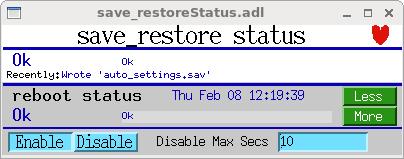
- save_restoreStatus*.adl: Status displays
- configMenu*.adl: Configuration management displays
Status Displays
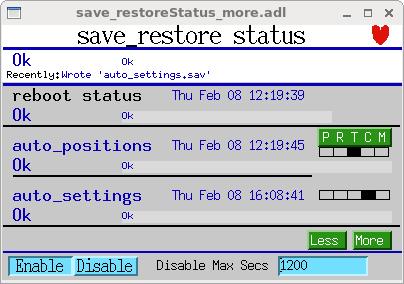
The save_restoreStatus displays show the current state of all save sets, including connection status, save times, and any errors.
The detailed status display shows additional information for each save set:
User-Callable Functions
Below are listed some common IOC shell functions. Full information on them can be found here
Configuration:
- save_restoreSet_DatedBackupFiles: Configure backup file naming
- save_restoreSet_periodicDatedBackups: Enable periodic dated backups
- save_restoreSet_NumSeqFiles: Set number of sequenced backup files
- save_restoreSet_SeqPeriodInSeconds: Set interval between sequenced backups
- save_restoreSet_RetrySeconds: Set delay between failed write and retry
- save_restoreSet_CallbackTimeout: Set interval between forced writes
- save_restoreSet_CAReconnect: Enable periodic PV reconnection
- save_restoreSet_IncompleteSetsOk: Allow saving/restoring incomplete sets
- save_restoreSet_FilePermissions: Set file permissions for .sav files
- save_restoreSet_NFSHost: Specify NFS host (vxWorks/RTEMS)
- save_restoreSet_status_prefix: Set prefix for status PVs
- save_restoreSet_UseStatusPVs: Enable/disable status PVs
- set_saveTask_priority: Set the save_restore task priority
Save Set Management:
- create_monitor_set: Create a save set triggered by PV changes
- create_periodic_set: Create a save set with time-based saving
- create_triggered_set: Create a save set with trigger-based saving
- create_manual_set: Create a save set for manual saving
- manual_save: Manually save current PV values
- reload_monitor_set: Change PVs and period for a monitor save set
- reload_periodic_set: Change PVs and period for a periodic save set
- reload_triggered_set: Change PVs and trigger for a triggered save set
- reload_manual_set: Change PVs in a manual save set
- remove_data_set: Delete a save set
- set_savefile_name: Change the save file name for a save set
File Paths:
- set_requestfile_path: Set path for request files
- set_savefile_path: Set path for save files
Restore:
- set_pass0_restoreFile: Specify files for pass 0 restore
- set_pass1_restoreFile: Specify files for pass 1 restore
- fdbrestore: Restore PVs from a save file at runtime
- fdbrestoreX: Restore PVs from any file at runtime (no backup, no
<END>required)
Status and Debug:
- save_restoreSet_Debug: Set debug level
- save_restoreShow: List save sets and their PVs
autosaveBuild:
- autosaveBuild: Configure automatic request-file generation
- eraseFile: Erase a file’s contents
- appendToFile: Add a line to a request file
Verification:
- asVerify: Compare PV values with saved values
Info Node:
- makeAutosaveFiles: Generate request files from info nodes
- makeAutosaveFileFromDbInfo: Generate a request file from specific info nodes
Example of Use
# Load database
dbLoadDatabase("$(TOP)/dbd/iocxxxVX.dbd")
iocxxxVX_registerRecordDeviceDriver(pdbbase)

### autoSaveRestore setup
save_restoreSet_Debug(0)
save_restoreSet_status_prefix("xxx:")
save_restoreSet_IncompleteSetsOk(1)
save_restoreSet_DatedBackupFiles(1)

# Specify paths
set_savefile_path(startup, "autosave")
set_requestfile_path(startup, "")
set_requestfile_path(std, "stdApp/Db")
set_requestfile_path(motor, "motorApp/Db")

# Specify restore files
set_pass0_restoreFile("auto_positions.sav")
set_pass0_restoreFile("auto_settings.sav")
set_pass1_restoreFile("auto_settings.sav")

# Configure options
save_restoreSet_NumSeqFiles(3)
save_restoreSet_SeqPeriodInSeconds(600)
save_restoreSet_RetrySeconds(60)
save_restoreSet_CAReconnect(1)
save_restoreSet_CallbackTimeout(-1)
save_restoreSet_NFSHost("oxygen", "164.54.49.4")

# Load status database
dbLoadRecords("$(AUTOSAVE)/asApp/Db/save_restoreStatus.db", "P=xxx:")

# After iocInit
create_monitor_set("auto_positions.req", 5, "P=xxx:")
create_monitor_set("auto_settings.req", 30, "P=xxx:")
makeAutosaveFiles()