
caputRecorder
Table of contents
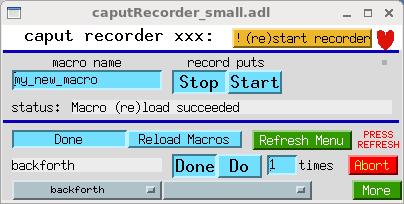 caputRecorder_small.adl
Overview
caputRecorder supports the recording and playback of sequences of caputs. It records each caput as a Python command, and a sequence of caputs as a Python function – also called here a macro. caputRecorder can also serve as a simple user interface for delivering canned Python functions to end users. caputRecorder communicates with users via an EPICS database, so it allows any EPICS record or channel-access client to record and run Python functions, and to wait for them to complete.
A caput is short for “Channel Access put”. When you press a button, or make a menu selection, in an MEDM (or other display manager) display, you are doing a caput. Any program that writes to EPICS PVs does so by doing caputs.
caputRecorder also supports generalizing recorded macros with arguments. This requires manual editing of Python code. It provides a user interface through which macro arguments are displayed with default values that can be changed via channel access.
This version of caputRecorder is known to work with Python 2.7. It probably will not work with Python 3.
caputRecorder is intended to meet the following kinds of needs:
-
Automate measurements involving sequences of steps that users know how to do manually, but for which no software has been written. If users can do a measurement step manually while the recorder is on, they will in effect have written software to automate that step, and they can then combine several such steps as needed to perform a particular instance of the measurement type.
-
Improve communication between users and the software developers who support them. Rather than describing needed software in general terms, or laboriously listing the required actions in the required order, a user can simply record them, with comments for any actions outside of EPICS, and send the developer the Python code.
-
Assist in troubleshooting, by recording exact sequences of caputs that do and do not reproduce a problem.
-
Automate testing, by recording sequences of caputs that succeed with the current version of some software, and playing them back to verify that they also succeed with the new version.
-
Show someone how to operate a complicated device by operating it yourself, while recording, and emailing them the Python code.
-
Record everything a user does. (But caPutLog is a much better tool for this purpose.)
How It Works
EPICS access security has the ability to call a user function whenever a caput that meets certain criteria is received by an IOC. The function is called an access-security trap listener, and caputRecorder provides one which writes a caput-notification string of the form pvname,value,user@host to an EPICS PV whenever an eligible caput is received by the IOC.
caputRecorder provides an EPICS database that contains the EPICS PV mentioned above, and other PVs that function as caputRecorder’s user interface. The user-interface PVs are monitored by the Python program caputRecorder.py, and direct its operation. When caputRecorder.py is given a macro name and told to record, it begins monitoring the caput-notification PVs of specified IOCs, and writes Python commands corresponding to each notification into the Python program file macros.py. Here is what a typical command looks like:
epics.caput("xxx:scan1.P1PV", "xxx:m2.VAL", wait=True, timeout=1000000.0)
This writes the string xxx:m2.VAL to xxx:scan1.P1PV, and waits for any EPICS processing that might result from the command to complete.
caputRecorder.py also inspects the file macros.py and writes the names of macros in the file to a set of EPICS menus (that is, to the menu-string fields of mbbo records). A user can select a macro name from those menus, and tell caputRecorder to execute that macro.
Thus, each IOC is responsible for telling caputRecorder that it received a caput, and one IOC also hosts the database through which the user tells caputRecorder what to do.
Dependencies
caputRecorder requires the following:
- EPICS base (3.14.12 or later, including 3.15+ and 7.0+)
- busy
- calc (for the sseq record)
- PyEpics (Python 2.7) – on the workstation running
caputRecorder.py - Optional: wxPython – for the file selector dialog in global variables