
PID Feedback
Table of contents
- Choosing the Right Database
- pid_control.db – Standard PID
- async_pid_control.db – Asynchronous PID
- fast_pid_control.db – Fast (Hardware) PID
- Tuning Guide
The std module provides three databases for PID (Proportional-Integral-Derivative) feedback control, all built around the EPID record. They differ in speed, flexibility, and how they communicate with hardware.
Choosing the Right Database
pid_control.db | async_pid_control.db | fast_pid_control.db | |
|---|---|---|---|
| Device support | Soft Channel | Async Soft Channel | Fast Epid |
| Speed | Up to ~10 Hz | Up to ~10 Hz | Up to ~10 kHz |
| Readback source | Any EPICS PV | Any EPICS PV (with trigger) | asyn ADC driver (e.g., IP330) |
| Output target | Any EPICS PV | Any EPICS PV | asyn DAC driver (e.g., DAC128V) |
| Cross-IOC | Same IOC only (DB links) | Yes (CA links) | No (direct asyn) |
| Trigger-read | No | Yes (TRIG/TVAL) | No (interrupt-driven) |
| PID runs in | Record processing thread | Record processing thread | asyn callback thread |
| Tweak controls | Yes (output + setpoint) | Yes (output + setpoint) | No |
| Stop button | Yes | Yes | No |
| Output transform | No | Yes (_outcalc) | No |
| Record count | 10 | 12 | 4 |
When to use each
-
pid_control.db– General-purpose soft feedback. Use when both the readback and control PVs are in the same IOC and the readback device responds synchronously. Suitable for slow loops (temperature control, beam position, etc.) where 10 Hz update rates are sufficient. -
async_pid_control.db– Use when the readback device requires a trigger-then-read sequence (e.g., averaging detectors, slow instruments). Also use when the readback PV is in a different IOC (CA links). The TRIG link triggers the readback, waits for completion via callback, then reads the result. -
fast_pid_control.db– Use when feedback must run faster than the EPICS scan system allows. The PID computation runs directly in the asyn interrupt callback at hardware speed. Requires asyn-compatible ADC and DAC hardware.
pid_control.db – Standard PID
Macros
| Macro | Default | Description |
|---|---|---|
P | PV prefix | |
PID | PID instance name | |
INP | Readback PV (DB link to controlled variable) | |
OUT | Output PV (where the manipulated variable is written) | |
SCAN | .1 second | Feedback update rate |
KP | 0.1 | Proportional gain |
KI | 1 | Integral gain (repeats/second) |
KD | 0 | Derivative gain (seconds) |
LOPR | 0 | Low operating range (display) |
HOPR | 10 | High operating range (display) |
DRVL | 0 | Low drive limit on output |
DRVH | 10 | High drive limit on output |
PREC | 3 | Display precision |
Records
| Record | Type | Purpose |
|---|---|---|
$(P)$(PID) | epid | Core PID controller (DTYP: Soft Channel) |
$(P)$(PID)_limits | transform | Propagates DRVL/DRVH to the epid record |
$(P)$(PID)_incalc | transform | Stub for user-defined input calculation |
$(P)$(PID)OUT_tweak | ao | Output tweak step size |
$(P)$(PID)OUT_tweak_up | calcout | Tweak output up by step |
$(P)$(PID)OUT_tweak_down | calcout | Tweak output down by step |
$(P)$(PID)SP_tweak | ao | Setpoint tweak step size |
$(P)$(PID)SP_tweak_up | calcout | Tweak setpoint up by step |
$(P)$(PID)SP_tweak_down | calcout | Tweak setpoint down by step |
$(P)$(PID)Stop | ao | Turns off feedback (FBON=0), then zeroes output |
$(P)$(PID)Stop2 | ao | Writes 0 to the output PV |
Signal Flow
$(INP) ---[INP]---> epid $(P)$(PID) ---[OUTL]---> $(OUT)
                          |
                        [FLNK]
                          v
                    $(P)$(PID)_limits ---[OUT]--> epid.DRVL / epid.DRVH
The _incalc transform record is an empty stub. Configure its expressions and links to pre-process the readback value before it reaches the epid record.
Example
dbLoadRecords("$(STD)/stdApp/Db/pid_control.db", "P=xxx:,PID=pid1,INP=xxx:readback,OUT=xxx:dac1,DRVL=0,DRVH=10,KP=0.05,KI=2,KD=0")
MEDM Displays
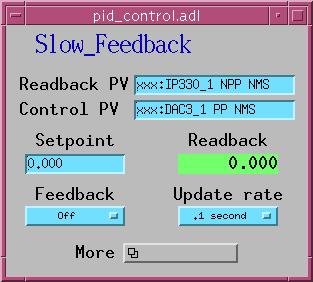
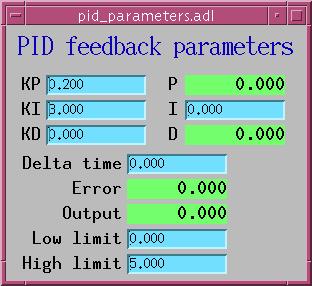
pid_control.adl, pid_parameters.adl
Autosave
Use pid_control_settings.req with macros P=$(P), PID=$(PID). This saves all tuning parameters, link definitions, tweak values, and both transform records.
async_pid_control.db – Asynchronous PID
This database adds support for readback devices that require a trigger-then-read sequence, and provides an output transform stage.
Additional Macros
Same macros as pid_control.db, but no defaults – all must be supplied. The INP link uses the CA attribute for cross-IOC compatibility.
Additional Records
In addition to all the records from pid_control.db:
| Record | Type | Purpose |
|---|---|---|
$(P)$(PID)_outcalc | transform | Output calculation stage (between epid OVAL and output PV) |
The epid record uses DTYP="Async Soft Channel", which enables two additional fields:
| Field | Purpose |
|---|---|
TRIG | Output link: triggers the readback device before reading |
TVAL | Value written to the TRIG link |
How Async Processing Works
- The record processes and writes
TVALtoTRIGviadbCaPutLinkCallback. - Processing pauses (PACT=TRUE) until the callback completes.
- When the readback device finishes, the callback fires and the record resumes.
- The controlled value is read from
INP, PID is computed, andOVALis written toOUTL.
This two-pass mechanism allows PID control with slow or averaging readback devices. For example, using the calc module’s userAve10.db to average multiple readings before the PID loop sees the result.
Example
dbLoadRecords("$(STD)/stdApp/Db/async_pid_control.db", "P=xxx:,PID=apid1,INP=xxx:avgResult CA,OUT=xxx:dac1,SCAN=1 second,KP=0.1,KI=0.5,KD=0,LOPR=0,HOPR=10,DRVL=0,DRVH=10,PREC=3")
Configure the TRIG and TVAL fields at runtime (or via autosave) to point at the readback trigger PV.
Autosave
Use async_pid_control_settings.req with macros P=$(P), PID=$(PID). This includes everything from pid_control_settings.req plus TRIG, TVAL, and the _outcalc transform.
fast_pid_control.db – Fast (Hardware) PID
This database runs PID feedback at hardware interrupt rates (up to ~10 kHz) using asyn drivers. The PID computation happens in the asyn callback thread, completely independent of EPICS record processing.
Macros
| Macro | Description |
|---|---|
P | PV prefix |
PID | PID instance name |
INPUT | asyn port name for the input device (e.g., IP330 ADC) |
ICHAN | Input channel number |
INPUT_DATA | asynDrvUser string for the data callback |
INPUT_INTERVAL | asynDrvUser string for the time-interval callback |
OUTPUT | asyn port name for the output device (e.g., DAC128V) |
OCHAN | Output channel number |
OUTPUT_DATA | asynDrvUser string for the output write |
SCAN | How often to refresh the display (not the feedback rate) |
KP, KI, KD | PID gains |
DT | Requested time per feedback point (seconds) |
LOPR, HOPR | Operating range |
DRVL, DRVH | Drive limits |
PREC | Display precision |
Records
| Record | Type | Purpose |
|---|---|---|
$(P)$(PID) | epid | PID controller (DTYP: Fast Epid). INP is INSTIO. |
$(P)$(PID)_limits | transform | Propagates DRVL/DRVH |
$(P)$(PID)_incalc | transform | Input calculation stub |
$(P)$(PID)Locked | bo | Lock status indicator |
Architecture
The epid record does not drive the feedback loop. Instead:
Hardware ADC ---[asyn interrupt]---> dataCallback()
                                        |
                                     do_PID()
                                        |
                                 asynFloat64->write()
                                        |
                                        v
                                   Hardware DAC

epid record (periodic SCAN) <---> epidFastPvt structure
  - Copies user changes (KP, KI, KD, VAL, FBON, DRVL, DRVH) to private data
  - Copies current state (CVAL, ERR, OVAL, P, I, D, DT) back for display
The SCAN field controls how often the record takes a “snapshot” of the feedback state for display purposes. The actual feedback rate is determined by the hardware interrupt rate and the DT field. If DT is longer than the hardware callback interval, multiple readings are averaged before each PID computation.
INP Field Format
The INP field uses INSTIO format. Because the full parameter string exceeds the INP field length, parameters are split between INP and DESC:
field(INP, "@$(INPUT) $(ICHAN) $(INPUT_DATA) $(INPUT_INTERVAL)")
field(DESC, "$(OUTPUT) $(OCHAN) $(OUTPUT_DATA)")
At initialization, device support concatenates these two strings and tokenizes them to extract all seven parameters.
Example
dbLoadRecords("$(STD)/stdApp/Db/fast_pid_control.db", "P=xxx:,PID=fPID1,INPUT=Ip330_1,ICHAN=0,INPUT_DATA=DATA,INPUT_INTERVAL=SCAN_PERIOD,OUTPUT=DAC1,OCHAN=0,OUTPUT_DATA=DATA,SCAN=1 second,KP=0.01,KI=10,KD=0,DT=0.001,LOPR=0,HOPR=10,DRVL=0,DRVH=10,PREC=4")
Autosave
Use fast_pid_control_settings.req with macros P=$(P), PID=$(PID). This saves tuning parameters and the _incalc transform, but not INP or OUTL (which are fixed at load time by the asyn port configuration).
Tuning Guide
For guidance on selecting optimal values for KP, KI, and KD, see the Feedback Tuning section in the EPID record documentation.
For a detailed discussion of why the EPID record uses absolute output values (rather than the differential output of the standard EPICS PID record), see Problems with the Standard EPICS PID Record.