
Filters
Table of contents
Motor-Driven Filters
filterMotor.db provides basic motor-driven filter support, using motor records to position individual filter blades in or out of the beam path. The related database filterLock.db provides interlock functionality to prevent filter changes during data acquisition.
XIA PF4 Dual Filter
| 2filter.adl | 2filter_setup.adl |
|---|---|
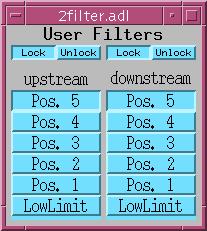 | 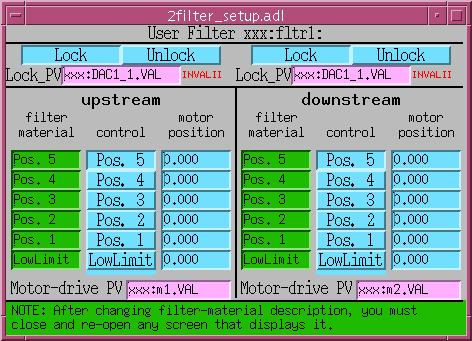 |
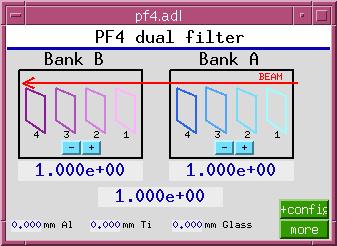
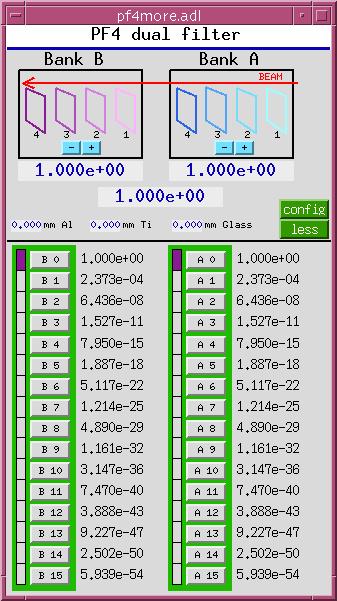
This software treats two XIA (X-Ray Instrumentation Associates) PF4 four-filter units as separate devices, though it does calculate the total transmission of the two units. Originally, this software supported only three filter-material choices, but support for 22 elemental filter materials was grafted on later. This software drives the filter via digital I/O PVs. It also monitors those PVs, and behaves correctly when they are changed by some external agent.
This software calculates the x-ray transmission for each combination of filters in one unit, given the current x-ray beam energy, and permits either direct setting of the desired transmission, or selection of the next higher, or next lower, transmission.
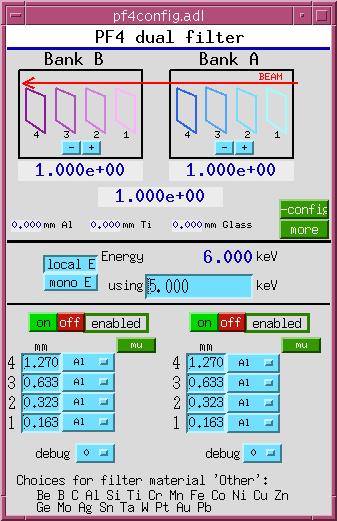
Loading the database
Add the following lines to the IOC startup file (st.cmd) before iocInit():
### Load database records for dual PF4 filters
dbLoadRecords("$(OPTICS)/opticsApp/Db/pf4common.db","P=xxx:,H=pf4:,A=A,B=B")
dbLoadRecords("$(OPTICS)/opticsApp/Db/pf4bank.db","P=xxx:,H=pf4:,B=A")
dbLoadRecords("$(OPTICS)/opticsApp/Db/pf4bank.db","P=xxx:,H=pf4:,B=B")
Add the following lines after iocInit():
# Start PF4 filter sequence program
#        name = what user will call it
#        P    = prefix of database and sequencer
#        H    = hardware (i.e. pf4)
#        B    = bank indicator (i.e. A,B)
#        M    = Monochromatic-beam energy PV
#        BP   = Filter control bit PV prefix
#        B1   = Filter control bit 0 number
#        B2   = Filter control bit 1 number
#        B3   = Filter control bit 2 number
#        B4   = Filter control bit 3 number
seq &pf4,"name=pf1,P=xxx:,H=pf4:,B=A,M=xxx:BraggEAO,BP=xxx:Unidig1Bo,B1=3,B2=4,B3=5,B4=6"
seq &pf4,"name=pf2,P=xxx:,H=pf4:,B=B,M=xxx:BraggEAO,BP=xxx:Unidig1Bo,B1=7,B2=8,B3=9,B4=10"
Autosave configuration
Add the following lines to auto_settings.req:
## PF4 dual filter
file pf4common.req P=$(P),H=pf4:
file pf4bank.req   P=$(P),H=pf4:,B=A
file pf4bank.req   P=$(P),H=pf4:,B=B
XIA PF4 Multiple Filter
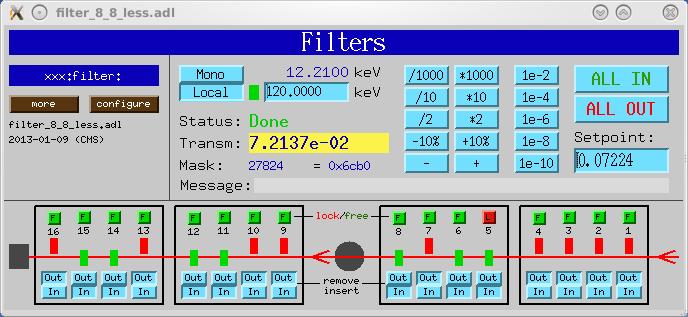
This software treats two or four XIA PF4 four-filter units as a single device. It drives the filters via digital I/O PVs. It also monitors those PVs, and behaves correctly when they are changed by some external agent.
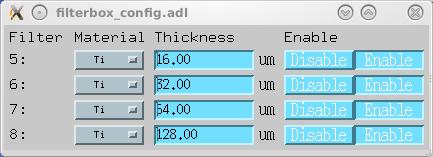
This software calculates the x-ray transmission for all combinations of all filters in all units, given the current x-ray beam energy. It permits direct setting of the desired transmission, setting the transmission relative to the current value (e.g., down by 10%, up by a factor of 2, etc.), and selection of the next higher, or next lower, transmission. It also permits individual filters to be removed from consideration, and locked in or out of the x-ray beam.
| filter.adl | filterbox_config.adl |
|---|---|
 |  |
Loading the database
Add the following lines to the IOC startup file (st.cmd) before iocInit():
### Load database records for alternative PF4-filter support
dbLoadTemplate "filter.substitutions"
Add the following lines after iocInit():
# Alternative pf4 filter seq program
seq filterDrive,"NAME=filterDrive,P=xxx:,R=filter:,NUM_FILTERS=16"
Here is a sample filter.substitutions file:
# filter.substitutions

file "$(OPTICS)/opticsApp/Db/filterBladeNoSensor.db" {
  pattern
  {P,           R,        N,   DESC,           OUT}
  {xxx:,   filter:,  1,   "Filter 1",     "xxx:Unidig1Bo0"}
  {xxx:,   filter:,  2,   "Filter 2",     "xxx:Unidig1Bo1"}
  {xxx:,   filter:,  3,   "Filter 3",     "xxx:Unidig1Bo2"}
  {xxx:,   filter:,  4,   "Filter 4",     "xxx:Unidig1Bo3"}
  {xxx:,   filter:,  5,   "Filter 5",     "xxx:Unidig1Bo4"}
  {xxx:,   filter:,  6,   "Filter 6",     "xxx:Unidig1Bo5"}
  {xxx:,   filter:,  7,   "Filter 7",     "xxx:Unidig1Bo6"}
  {xxx:,   filter:,  8,   "Filter 8",     "xxx:Unidig1Bo7"}
  {xxx:,   filter:,  9,   "Filter 9",     "xxx:Unidig1Bo8"}
  {xxx:,   filter:,  10,  "Filter 10",    "xxx:Unidig1Bo9"}
  {xxx:,   filter:,  11,  "Filter 11",    "xxx:Unidig1Bo10"}
  {xxx:,   filter:,  12,  "Filter 12",    "xxx:Unidig1Bo11"}
  {xxx:,   filter:,  13,  "Filter 13",    "xxx:Unidig1Bo12"}
  {xxx:,   filter:,  14,  "Filter 14",    "xxx:Unidig1Bo13"}
  {xxx:,   filter:,  15,  "Filter 15",    "xxx:Unidig1Bo14"}
  {xxx:,   filter:,  16,  "Filter 16",    "xxx:Unidig1Bo15"}
}

file "$(OPTICS)/opticsApp/Db/filterDrive.db" {
  {P="xxx:", R="filter:", DESC="Filters", KEV="xxx:BraggEAO"}
}
Autosave configuration
Add the following to auto_settings.req:
file filterDrive.req "P=xxx:,R=filter:"
file filterBladeNoSensor.req "P=xxx:,R=filter:,N=1"
file filterBladeNoSensor.req "P=xxx:,R=filter:,N=2"
file filterBladeNoSensor.req "P=xxx:,R=filter:,N=3"
file filterBladeNoSensor.req "P=xxx:,R=filter:,N=4"
file filterBladeNoSensor.req "P=xxx:,R=filter:,N=5"
file filterBladeNoSensor.req "P=xxx:,R=filter:,N=6"
file filterBladeNoSensor.req "P=xxx:,R=filter:,N=7"
file filterBladeNoSensor.req "P=xxx:,R=filter:,N=8"
file filterBladeNoSensor.req "P=xxx:,R=filter:,N=9"
file filterBladeNoSensor.req "P=xxx:,R=filter:,N=10"
file filterBladeNoSensor.req "P=xxx:,R=filter:,N=11"
file filterBladeNoSensor.req "P=xxx:,R=filter:,N=12"
file filterBladeNoSensor.req "P=xxx:,R=filter:,N=13"
file filterBladeNoSensor.req "P=xxx:,R=filter:,N=14"
file filterBladeNoSensor.req "P=xxx:,R=filter:,N=15"
file filterBladeNoSensor.req "P=xxx:,R=filter:,N=16"
Display files
Top-level MEDM display files for this support:
| File | Description |
|---|---|
filter_8_0_more.adl | Two PF4 4-filter units |
filter_8_8_more.adl | Four PF4 4-filter units |
To load the MEDM display, specify a related display button with entries such as:
Display Label: PF4 filter 16
Display File: filter_8_8_more.adl
Arguments: P=xxx:,R=filter